Your AI assistant can write a poem in seconds, yet it may have no idea what happened last week. That gap is exactly what retrieval-augmented generation closes. Instead of guessing from old training memory, the model looks up fresh facts first. If you are also weighing fine-tuning vs prompt engineering vs RAG, this guide will help you see where RAG fits.
By the end, you will know how the process works, which parts it needs, and where it can go wrong. Along the way, we will keep the language simple and the examples practical. So, even if you are new to AI, you can follow each step.
What Retrieval-Augmented Generation Means
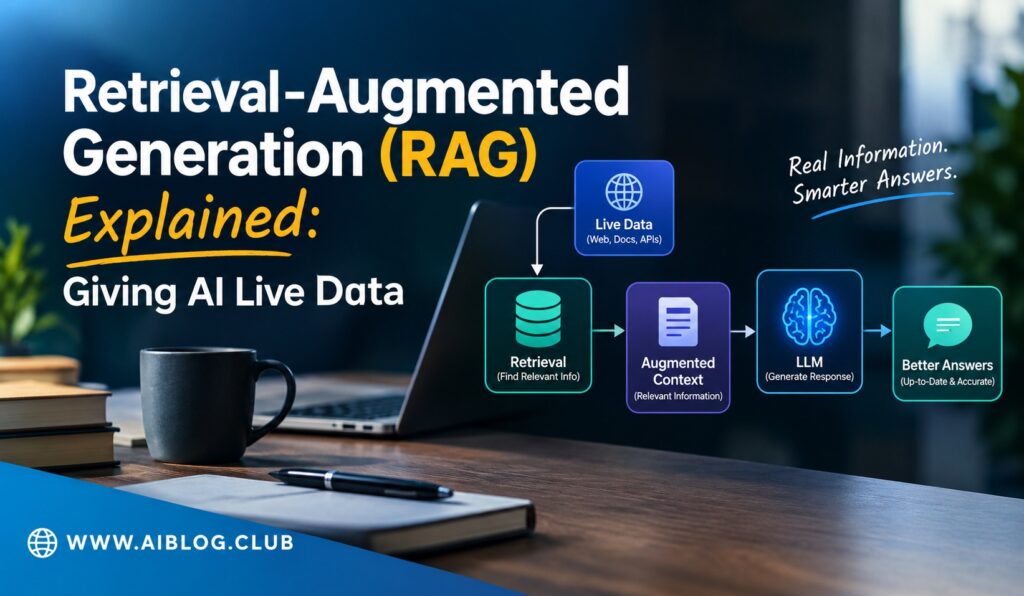
Put simply, retrieval-augmented generation is a method that lets an AI model fetch information before it writes an answer. The name has three parts. Retrieval means finding useful text. Augmented means adding that text to the question. Generation means the model writes the reply using both.
Think of an open-book exam. A student who can check the textbook will usually give better answers than a student who relies on memory alone. In the same way, a model with access to a document library can answer with more care. Of course, the model still writes the words, but the facts come from the library.
This idea became popular because it is cheap and fast to set up. Teams do not need to rebuild the model each time their data changes. They only need to update the documents, and the next answer reflects the change.
Why AI Models Need Live Data
Every language model learns from a fixed set of text, and that learning stops at a certain date. After that point, the model knows nothing new. For example, it cannot tell you about a policy your company changed yesterday. It also cannot read your private files unless you give them to it.
Because of this limit, models sometimes fill gaps with confident but wrong answers. That problem is common enough to deserve its own guide, which you can find in why AI hallucinates and how to fact-check outputs. Live data is one of the strongest fixes, since the model can point to a real source.
There is a second benefit as well. When the answer comes from a known document, a person can check it. As a result, trust goes up. Users can see where a claim came from and judge it for themselves.
How RAG Works Step by Step
The process looks complex from the outside, but it follows a clear path. Each step does one small job. Once you see the order, the whole system feels much less mysterious.
The Basic Flow
- Collect documents. Gather the files you want the AI to use, such as manuals, help pages, or reports.
- Split them into chunks. Cut long files into short pieces so each piece covers one idea.
- Turn chunks into vectors. An embedding model converts each piece of text into a list of numbers that captures its meaning.
- Store the vectors. A vector database keeps them so they can be searched quickly.
- Search at question time. When a user asks something, the system turns the question into numbers and finds the closest chunks.
- Build the prompt. The best chunks are pasted into the prompt along with the question.
- Generate the answer. The model writes a reply grounded in those chunks.
Notice that the model itself never changes. Only the information placed in front of it changes. That is why many teams find RAG easier to maintain than other methods.
The Main Parts of a RAG System
A working setup has a handful of pieces, and each one affects the quality of the final answer. If one piece is weak, the whole chain suffers. For instance, poor chunking can bury a good answer inside a messy block of text.
| Part | What It Does | Common Choice |
| Document loader | Reads files into plain text | PDF, web page, or database readers |
| Chunker | Splits text into small pieces | Fixed size or by paragraph |
| Embedding model | Turns text into number lists | A text embedding model |
| Vector database | Stores and searches vectors | A managed or open source store |
| Language model | Writes the final answer | Any capable chat model |
Chunk size deserves special attention. If pieces are too small, they lose context. If they are too large, they bring in noise. Most teams test a few sizes and keep the one that returns the clearest answers.
Another useful piece is a re-ranker. It takes the first batch of results and sorts them again by how well they match the question. Although it adds a step, it often improves accuracy.
Where RAG Is Used Today
Many everyday tools use this method, even if the label never appears on screen. Customer support bots are the clearest case. They search a help center and answer using the exact wording found there. Because the content stays current, customers get fewer outdated replies.
Inside companies, staff use RAG to search internal wikis, policy files, and past reports. A new hire can ask a plain question and get an answer drawn from real documents. Meanwhile, the company avoids retraining a model every time a policy shifts.
Research and legal teams also use it to scan large piles of text. The model can pull the right passage and summarize it. Still, a human should check the source before acting on it. After all, a summary is only as good as the passage behind it.
Education is another growing area. A school can load its textbooks and let students ask questions in plain language. The answers stay tied to approved material, which keeps the tutor on topic.
Limits and Common Mistakes
RAG is useful, but it is not magic. If the search step returns the wrong chunk, the model may build a polished answer on a weak base. In other words, bad retrieval leads to bad output, even with a strong model.
Here are some mistakes that appear again and again:
- Messy source files. Duplicate, outdated, or contradictory documents confuse the search.
- Poor chunking. Splitting in the middle of a key idea hides the meaning.
- No testing. Teams skip checking real questions against real answers.
- Too many chunks. Stuffing the prompt with text can drown the useful part.
- Ignoring access rules. Private files must stay limited to the right users.
Security matters here too. Since the system reads private documents, it must respect who is allowed to see what. Otherwise, a user might see an answer built from a file they should never open.
Also keep in mind that RAG reduces wrong answers but does not remove them. The model can still misread a passage. Therefore, a quick review step is wise for any task with real stakes.
How to Start a Small RAG Project
You do not need a big budget to try this. A small test can teach you a lot in a week. Start with one narrow topic, such as a single product manual or a short help center.
First, pick around twenty real questions that users ask. Next, build the simplest pipeline you can and see how it answers. Then compare the replies with the correct answers and mark each one as right or wrong. Once you see the pattern of failures, you will know whether to fix the chunking, the search, or the source files.
After that, add one improvement at a time. For example, try a re-ranker or adjust the chunk size. By changing only one thing, you can tell what helped. Before long, you will have a setup that is both simple and dependable.
Finally, keep the documents fresh. A RAG system is only as current as its library. Set a schedule to add new files and remove old ones.
Key Takeaways
- What it is: Retrieval-augmented generation lets a model look up facts before it answers.
- Main benefit: Answers can use fresh and private data without retraining the model.
- Core steps: Split documents, create vectors, search, add the best chunks to the prompt, then generate.
- Biggest risk: Weak retrieval produces weak answers, so test with real questions.
- Best first step: Start with one narrow topic and about twenty test questions.
Frequently Asked Questions
What does RAG stand for in AI?
RAG stands for retrieval-augmented generation, a method that adds searched information to a prompt before the model replies.
Does RAG stop AI from making things up?
It lowers the chance of wrong answers by grounding replies in real documents, but it does not remove the risk completely.
Do I need to retrain the model to use RAG?
No, because the model stays the same and only the documents you feed it change.
What is a vector database?
It is a storage tool that holds text as number lists so the system can find similar meanings quickly.
Is RAG better than fine-tuning?
Neither wins every time, since RAG suits changing facts and fine-tuning suits fixed style or behavior.
Conclusion
Retrieval-augmented generation gives AI a simple gift: access to the right facts at the right moment. It works by searching your documents, adding the best pieces to the prompt, and letting the model write from them. Because the data can change without retraining, the method stays practical for most teams. If you start small, test often, and keep your files clean, RAG can turn a general model into a helpful and trustworthy assistant.