A chatbot waits for your question, but an agent goes off and finishes the job. That one difference explains most of the buzz around AI agents vs chatbots in 2026. Both tools use language models, yet they behave very differently once the conversation starts. Agents also depend on good facts, which is why many pair them with retrieval-augmented generation and live data.
This guide explains each tool in simple terms, compares them side by side, and shows how autonomous workflows run. By the end, you will know which one fits your needs and what safety rules to follow.
What a Chatbot Does
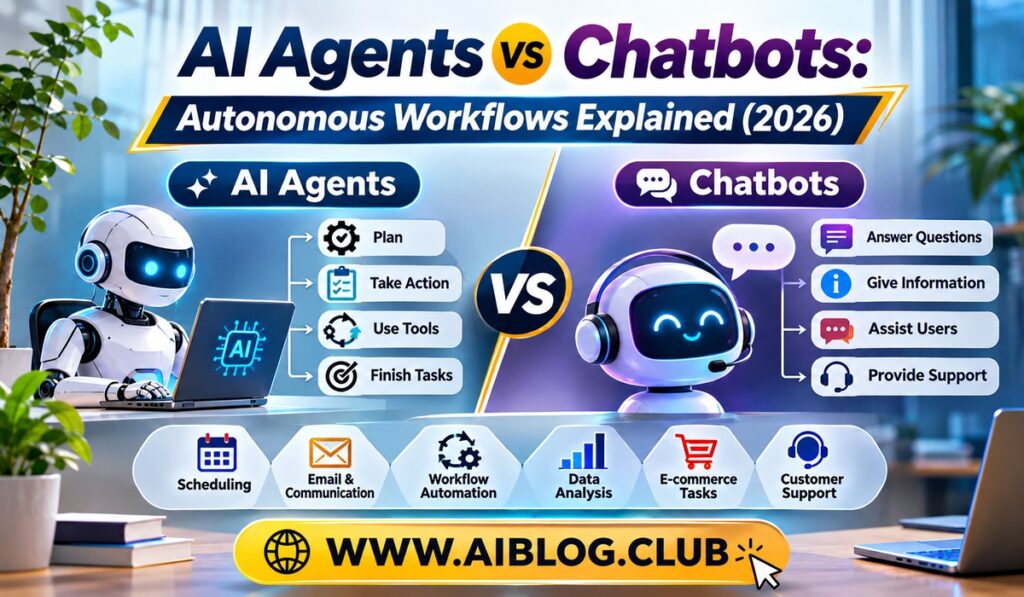
A chatbot is a program that talks with you in plain language. You type a message, and it replies. Then it waits for your next message. Most of the time, it works one turn at a time and does not take actions outside the chat window.
Early chatbots followed fixed scripts. If you typed a certain word, they gave a set reply. Modern chatbots use language models, so they can handle open questions and write long answers. Even so, the basic pattern stays the same: you ask, and it answers.
Chatbots shine at tasks like answering common questions, drafting text, explaining ideas, and giving quick advice. For example, a store chatbot can tell you the return policy. Because the task is simple and short, this style works well.
What an AI Agent Does
An AI agent is a system that takes a goal and works toward it with little hand-holding. Instead of only replying, it plans steps, uses tools, checks results, and adjusts. In other words, it acts, not just talks.
Suppose you say, “Find three flights under a set budget and add the best one to my calendar.” A chatbot might list ideas. An agent would search flight sites, compare prices, pick an option, and create the calendar entry. Of course, a good agent should ask for your approval before spending money.
What Agents Usually Include
- A language model. It reads the goal and decides what to do next.
- Tools. These can be search, email, spreadsheets, code runners, or business apps.
- Memory. The agent keeps track of what it has already done.
- A planning loop. It repeats a cycle of think, act, and check until the goal is met.
- Limits. Rules define what it may and may not do.
The Core Differences
Both tools can sound alike in a demo. Under the surface, however, they differ in how much they do on their own. The table below gives a quick view.
| Feature | Chatbot | AI Agent |
| Main job | Answer and talk | Complete a goal |
| Steps per request | Usually one reply | Many planned steps |
| Uses outside tools | Rarely | Often |
| Needs your input | Every turn | Mostly at start and key points |
| Main risk | Wrong or unclear answers | Wrong actions with real effects |
Notice the last row. A wrong answer from a chatbot can be ignored. A wrong action from an agent, such as sending an email or deleting a file, is harder to undo. For this reason, agents need stronger guardrails.
Also, the line between the two keeps blurring. Many chatbots now have simple tools, such as web search. Meanwhile, many agents still use a chat window as their front door. So, think of it as a spectrum, not a strict split.
How an Autonomous Workflow Runs
An autonomous workflow is a chain of steps that an agent carries out to reach a goal. Each step builds on the one before it. Seeing the flow helps you understand both the power and the risk.
A Typical Agent Loop
- Receive the goal. You describe what you want in plain language.
- Make a plan. The agent breaks the goal into smaller tasks.
- Pick a tool. It chooses the right tool for the first task, such as a search or a spreadsheet.
- Take an action. The tool runs and returns a result.
- Check the result. The agent decides whether the step worked.
- Repeat or finish. It moves to the next task or fixes the last one until the goal is done.
- Report back. It summarizes what it did and asks for approval where needed.
Because each step depends on earlier ones, one early mistake can carry through the whole chain. That is why good agents include checkpoints. At these points, a human can review the work before the agent continues.
Real Examples of Agent Workflows
Agents are already useful in everyday office work. The best uses involve tasks with clear steps and easy ways to check the result. Here are a few common cases.
In customer support, an agent can read a ticket, look up the order, check the policy, and draft a reply. A human can then approve it with one click. As a result, response time drops while quality stays under control.
In research, an agent can search several sources, collect key points, and build a short summary with links. Still, a person should confirm the sources, since models can make errors. Our guide on why AI hallucinates and how to fact-check outputs explains how to do that well.
In software work, agents can read code, run tests, and suggest fixes. Meanwhile, in finance and sales teams, they can pull data from different tools and prepare weekly reports. Although results vary, the pattern is the same: repeat a clear process with light human oversight.
Risks and Safety Rules
Since agents act in the real world, mistakes carry real costs. A chatbot that misreads a question wastes a minute. An agent that misreads a task could email the wrong person or change the wrong record. So, a few safety rules are worth following.
- Give the least access needed. Only connect the tools the task truly requires.
- Require approval for big actions. Payments, deletions, and outside emails should need a human yes.
- Keep logs. Record each step so you can see what happened and why.
- Set spending and time limits. Stop the agent if it runs too long or costs too much.
- Test in a safe space first. Try new workflows on sample data before real data.
- Watch for bad instructions. Text from web pages or emails can try to trick an agent, so treat outside content with care.
In addition, keep a person responsible for the result. An agent can do the work, but accountability stays with the team that deployed it. After all, the tool has no way to take blame.
Choosing Between an Agent and a Chatbot
Start with the task. If you only need answers, drafts, or quick explanations, a chatbot is simple and safe. If the job needs many steps across several tools, an agent may save real time.
Next, think about the cost of a mistake. If an error is cheap and easy to fix, you can give an agent more freedom. If an error is costly or hard to reverse, keep a human in the loop at every key step. For a deeper look at the methods that shape AI behavior, see fine-tuning vs prompt engineering vs RAG.
Finally, start small. Pick one repeated task, build a simple workflow, and measure the results. Because you can check each outcome, you will learn quickly where the agent helps and where it struggles. Over time, you can widen the scope as trust grows.
Key Takeaways
- Chatbots: They answer and talk, usually one reply at a time.
- AI agents: They plan, use tools, and work toward a goal across many steps.
- Biggest difference: Agents take real actions, so mistakes cost more.
- Safety basics: Limit access, require approval for big actions, and keep logs.
- Best first step: Automate one small, repeated task and measure the results.
Frequently Asked Questions
What is the main difference between an AI agent and a chatbot?
A chatbot mainly answers questions, while an agent plans and carries out multi-step tasks using tools.
Can a chatbot become an agent?
Yes, once you give a chatbot tools and let it plan and act toward a goal, it behaves like an agent.
Are AI agents safe to use at work?
They can be safe when you limit access, require approval for big actions, and keep clear logs.
Do agents replace human workers?
They usually handle repeated steps, while people still set goals, review results, and take responsibility.
Which one should a small business try first?
A small business should usually start with a chatbot for simple questions and add an agent for one clear, repeated task.
Conclusion
The debate of AI agents vs chatbots comes down to action. Chatbots talk and answer, while agents plan, use tools, and finish tasks. Both have a place in 2026, and the right choice depends on the job and the cost of a mistake. Start with a simple chatbot for answers, add an agent for one well-defined workflow, and keep humans in charge of anything that matters. With that approach, you gain speed without giving up control.